
Common VoIP Issues and Expert Solutions You Should Know
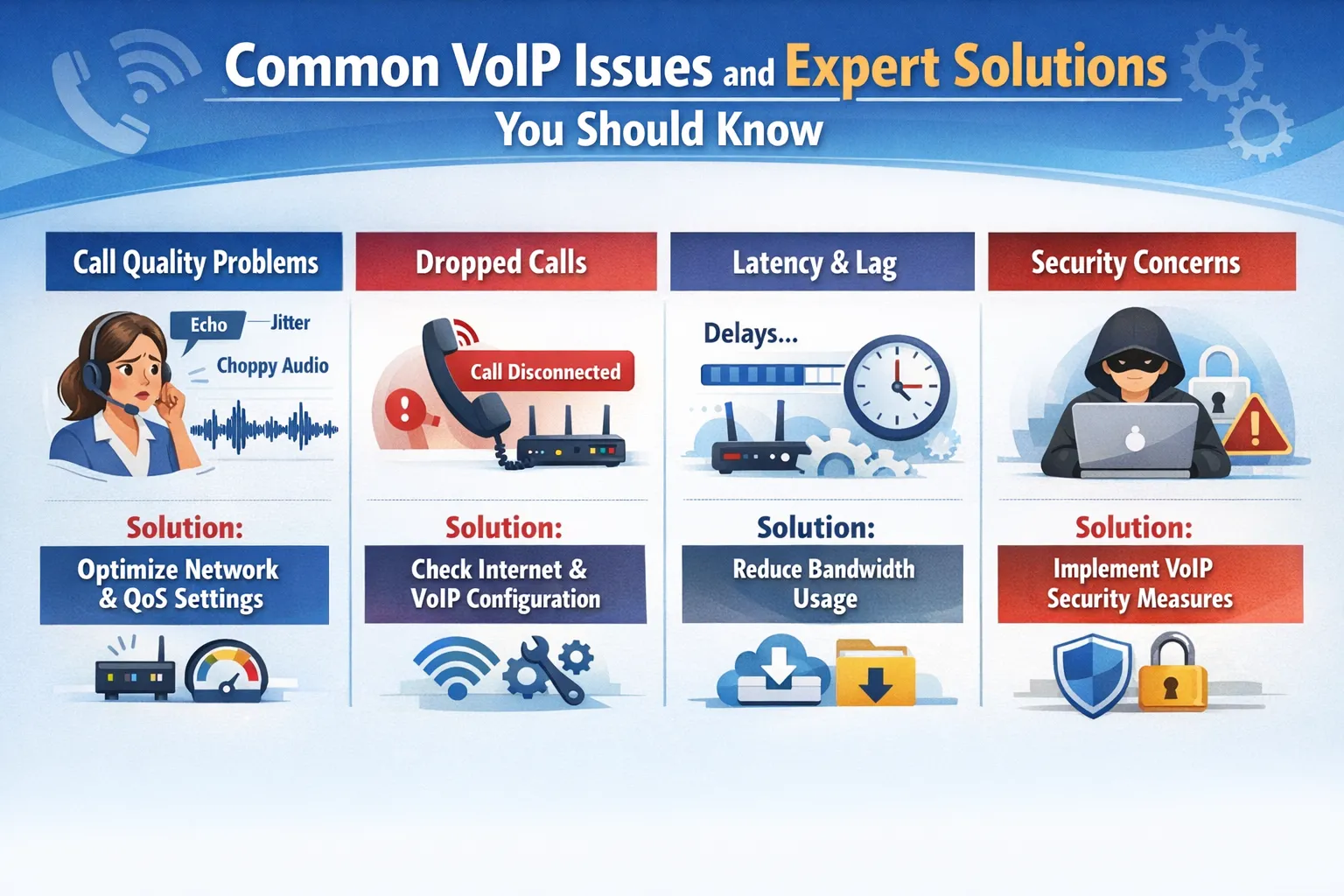
Voice over Internet Protocol (VoIP) has revolutionized how businesses communicate, offering cost-effective and flexible calling solutions that traditional phone systems simply can’t match. However, like any technology that relies on internet connectivity, VoIP comes with its own set of challenges. Understanding these common issues and knowing how to solve them can mean the difference between seamless communication and frustrating disruptions that impact your business operations.
Whether you’re running a small startup or managing enterprise-level communications, VoIP problems can affect anyone. The good news? Most VoIP issues have straightforward solutions once you understand what’s causing them. Let’s explore the most common VoIP challenges and the expert solutions that will keep your communication system running smoothly.
Poor Call Quality and Audio Issues
Nothing frustrates users more than poor call quality. Choppy audio, echoes, robotic voices, or calls that sound like you’re talking underwater can severely impact business communications and damage professional relationships.
The Root Causes
Poor call quality typically stems from insufficient bandwidth, network congestion, or codec mismatches. When your internet connection can’t handle the data requirements of voice packets, quality suffers immediately. Jitter, which is the variation in packet arrival times, causes audio to sound choppy or robotic. Packet loss, where data packets fail to reach their destination, creates gaps in conversation.
Expert Solutions
Start by conducting a bandwidth test to ensure you have adequate internet speed. VoIP requires at least 100 kbps per call, but businesses should aim for much higher to account for multiple simultaneous calls and other internet usage. Implement Quality of Service (QoS) settings on your router to prioritize VoIP traffic over less critical data like file downloads or video streaming.
Consider upgrading to a business-grade internet connection with guaranteed bandwidth and lower latency. Consumer internet plans often oversell capacity, leading to congestion during peak hours. Additionally, ensure your VoIP system uses efficient codecs like G.729 or Opus, which provide excellent quality while using minimal bandwidth.
Echo and Feedback Problems
Echo during VoIP calls creates an unprofessional impression and makes conversations difficult to follow. This issue occurs when speakers hear their own voice repeated back to them, typically with a slight delay.
Understanding the Problem
Echo usually results from acoustic feedback between a device’s speaker and microphone, impedance mismatches in the network, or hybrid echo caused by the conversion between analog and digital signals. The problem becomes more noticeable when call participants use speakerphones or low-quality headsets.
Proven Fixes
Encourage users to wear headsets instead of using speakerphones, as this eliminates the feedback loop between speakers and microphones. Modern VoIP systems include echo cancellation features—make sure these are enabled in your settings. Network echo cancellers should be configured properly to eliminate hybrid echo, particularly if your VoIP system connects to traditional phone lines.
Check your audio device settings and reduce speaker volume if echo persists. Sometimes, simply moving away from hard surfaces that reflect sound or using acoustic panels in conference rooms can significantly reduce echo problems.
Latency and Delayed Audio
Latency, or the delay between speaking and being heard, disrupts natural conversation flow and leads to people talking over each other. While some latency is unavoidable in internet-based systems, excessive delays indicate serious problems.
Why It Happens
Latency occurs when voice packets take too long to travel from sender to receiver. Geographic distance plays a role, but the main culprits are network congestion, inefficient routing, processing delays in VoIP equipment, and insufficient bandwidth. Acceptable latency for VoIP is under 150 milliseconds; anything above that becomes noticeable and disruptive.
Solutions That Work
Use a wired ethernet connection instead of Wi-Fi whenever possible, as wireless connections introduce additional latency and packet loss. Evaluate your network route—sometimes voice packets take unnecessarily complex paths through the internet. Working with your VoIP provider to optimize routing can dramatically reduce latency.
Upgrade outdated networking equipment that may be introducing processing delays. Modern routers and switches handle VoIP traffic more efficiently. If your business operates across multiple locations, consider using a dedicated VoIP network or VPN to ensure consistent, optimized routing.
Dropped Calls and Connectivity Issues
Dropped calls are more than an inconvenience—they can cost your business opportunities and damage customer relationships. When calls suddenly disconnect or fail to connect in the first place, it points to underlying connectivity problems.
The Underlying Issues
Dropped calls usually result from unstable internet connections, insufficient bandwidth, firewall interference, or Session Initiation Protocol (SIP) configuration errors. Network instability causes VoIP devices to lose their connection to the service provider, immediately terminating active calls.
Effective Remedies
First, ensure your internet connection is stable by checking for line quality issues with your ISP. Run continuous ping tests to identify packet loss or connection drops. Consider implementing a backup internet connection for failover protection—even a 4G/5G connection can maintain VoIP service if your primary connection fails.
Configure your firewall properly to allow VoIP traffic through necessary ports (typically UDP ports 5060-5061 for SIP and 10000-20000 for RTP). Work with your VoIP provider to ensure SIP ALG (Application Layer Gateway) is disabled on your router, as this feature often interferes with VoIP connections more than it helps.
Jitter and Packet Loss
While related to call quality issues, jitter and packet loss deserve special attention because they’re among the most technical VoIP problems businesses face. These issues can occur even with adequate bandwidth if your network isn’t properly configured.
Technical Breakdown
Jitter refers to irregular packet delivery—when some packets arrive quickly while others are delayed, causing voice data to arrive out of order. Packet loss means some voice data never arrives at all. Both create choppy, incomprehensible audio that makes VoIP unusable for business purposes.
Expert-Level Solutions
Implement jitter buffers on your VoIP devices to smooth out packet arrival times. These buffers temporarily store incoming packets and release them at a steady rate, compensating for network inconsistencies. However, buffers that are too large introduce additional latency, so finding the right balance is crucial.
Use QoS configuration to mark VoIP packets with high priority (DSCP values), ensuring routers handle them before less critical traffic. Monitor your network for packet loss patterns—if loss occurs consistently at certain times, it indicates bandwidth issues or network congestion that needs addressing. Consider segmenting your network with VLANs to separate voice traffic from data traffic entirely.
Security Vulnerabilities
VoIP systems face unique security challenges because they combine telecommunications with internet technology. From eavesdropping to toll fraud, security breaches can be costly and compromise sensitive business information.
Common Threats
VoIP systems are vulnerable to eavesdropping, where attackers intercept unencrypted calls to steal information. Toll fraud occurs when hackers gain access to your system and make expensive international calls charged to your account. Denial of service attacks can flood your VoIP system with traffic, making it unusable. Vishing (voice phishing) uses VoIP technology to impersonate legitimate callers and steal information.
Comprehensive Protection
Enable encryption for all VoIP calls using protocols like SRTP (Secure Real-time Transport Protocol) and TLS (Transport Layer Security). Implement strong authentication measures, including complex passwords and two-factor authentication for administrative access to your VoIP system.
Use a Session Border Controller (SBC) to create a security barrier between your internal network and the public internet. SBCs filter traffic, hide network topology, and prevent many common VoIP attacks. Regularly update VoIP firmware and software to patch security vulnerabilities, and consider implementing intrusion detection systems specifically designed for VoIP environments.
Monitor your VoIP system for unusual calling patterns that might indicate fraud, such as multiple international calls during off-hours. Many modern VoIP systems include fraud detection features that can alert you to suspicious activity automatically.
One-Way Audio Problems
Few VoIP issues are more frustrating than one-way audio, where one party can hear the other but not vice versa. This problem often occurs randomly, making it particularly difficult to diagnose and resolve.
Why It Occurs
One-way audio typically results from NAT (Network Address Translation) configuration issues, firewall rules blocking return traffic, or SIP ALG interference. When voice packets successfully travel in one direction but get blocked or lost on the return path, you experience one-way audio.
Reliable Solutions
Configure your router’s NAT correctly to handle VoIP traffic, often by setting up port forwarding for the specific ports your VoIP system uses. Disable SIP ALG on your router, as this “helpful” feature frequently causes more problems than it solves by modifying SIP packets in ways that break connectivity.
Check that your firewall allows bidirectional traffic on necessary ports. Stateful firewalls should automatically allow return traffic, but misconfigurations can block responses. If you’re using a VoIP provider, ask about STUN (Session Traversal Utilities for NAT) or TURN (Traversal Using Relays around NAT) servers that help devices behind NAT communicate effectively.
Device Compatibility and Registration Issues
VoIP systems rely on devices successfully registering with service providers to make and receive calls. Registration failures prevent your entire VoIP system from functioning, making this a critical issue to resolve quickly.
Common Causes
Registration problems often stem from incorrect credentials, network connectivity issues, expired certificates, or compatibility problems between devices and VoIP platforms. Sometimes, the issue is as simple as entering the wrong username or password, while other times it involves complex SIP configuration parameters.
Troubleshooting Steps
Verify all credentials are correct, including username, password, domain, and proxy server addresses. Check that your devices have stable network connectivity and can reach your VoIP provider’s servers. Test connectivity by pinging the SIP server address from your VoIP device.
Ensure your VoIP devices’ firmware is current, as older firmware may not be compatible with your provider’s latest infrastructure. Review registration logs for error codes that can pinpoint the exact problem. If devices previously worked but suddenly can’t register, check if your provider changed server addresses or implemented new security requirements.
Frequently Asked Questions (FAQs)
What is the most common VoIP problem?
The most common VoIP problem is poor call quality, which manifests as choppy audio, dropped words, or robotic-sounding voices. This issue typically stems from insufficient bandwidth, network congestion, or improper Quality of Service (QoS) settings. Most call quality issues can be resolved by ensuring adequate internet speed (at least 100 kbps per call), implementing QoS to prioritize voice traffic, and using a wired connection instead of Wi-Fi whenever possible.
How much bandwidth do I need for VoIP calls?
For basic VoIP functionality, you need at least 100 kbps (kilobits per second) upload and download speed per concurrent call. However, businesses should plan for significantly more to ensure quality. A good rule of thumb is to allocate 100 kbps per call plus an additional 20% buffer for overhead. For example, if your office makes 10 simultaneous calls, you’d need at least 1.2 Mbps dedicated to VoIP. Remember to account for other internet activities happening simultaneously.
Why does my VoIP call have an echo?
Echo in VoIP calls occurs when your voice is reflected back to you, usually caused by acoustic feedback between speakers and microphones, network impedance mismatches, or inadequate echo cancellation. The most common culprit is using speakerphones or having speaker volume too high, creating a feedback loop. To fix echo issues, use a quality headset, enable echo cancellation in your VoIP settings, reduce speaker volume, and ensure your VoIP equipment firmware is up to date.
Can Wi-Fi be used for VoIP or do I need wired connections?
While Wi-Fi can work for VoIP, wired ethernet connections are strongly recommended for optimal performance. Wi-Fi introduces additional latency, packet loss potential, and bandwidth variability that can degrade call quality. If you must use Wi-Fi, ensure you have a modern router with 5GHz capability, strong signal strength, and minimal interference. Place VoIP devices close to the router and consider implementing a dedicated Wi-Fi network for voice traffic separate from general data usage.
What is jitter and how do I fix it?
Jitter is the irregular timing of voice packet delivery over the network, causing audio to sound choppy or garbled. It occurs when network conditions cause some packets to arrive faster than others, disrupting the smooth flow of conversation. To fix jitter, implement jitter buffers on your VoIP devices (typically 30-50 milliseconds), configure QoS settings to prioritize voice packets, reduce network congestion by upgrading bandwidth, and use wired connections. Most modern VoIP systems include automatic jitter buffer adjustment.
How secure is VoIP from hackers?
VoIP security depends entirely on how well your system is configured. Without proper security measures, VoIP is vulnerable to eavesdropping, toll fraud, and denial of service attacks. However, with encryption (SRTP and TLS), strong authentication, Session Border Controllers, and regular security updates, VoIP can be highly secure. Implement encryption for all calls, use complex passwords with two-factor authentication, monitor for unusual calling patterns, and work with reputable VoIP providers who prioritize security.
Why do my VoIP calls keep dropping?
Dropped calls typically result from unstable internet connections, insufficient bandwidth, firewall interference, or improper SIP configuration. Network instability causes your VoIP device to lose connection with the service provider, immediately terminating the call. To prevent dropped calls, ensure you have a stable internet connection with adequate bandwidth, configure firewalls to allow VoIP traffic through necessary ports, disable SIP ALG on your router, and consider implementing a backup internet connection for redundancy.
What is the difference between latency and jitter?
Latency is the total time it takes for a voice packet to travel from sender to receiver, measured as a delay in milliseconds. Acceptable VoIP latency is under 150ms. Jitter, on the other hand, is the variation in latency—the inconsistency in packet arrival times. You can have low average latency but high jitter if some packets arrive quickly while others are delayed. Both affect call quality, but they require different solutions. Latency is fixed by improving network speed and routing, while jitter is managed with jitter buffers and QoS prioritization.
Can I use VoIP with my existing business phone numbers?
Yes, absolutely! Most VoIP providers support number porting, allowing you to transfer your existing business phone numbers to their service. The porting process typically takes 7-14 business days and involves submitting authorization forms to release your numbers from your current provider. You can also keep your traditional phone lines while adding VoIP numbers, or configure VoIP systems to work alongside existing PBX equipment during a transition period.
What should I do if only one person can hear audio on a call?
One-way audio problems usually indicate NAT (Network Address Translation) or firewall configuration issues. When voice packets successfully travel in one direction but get blocked returning, only one party can hear. To fix this, disable SIP ALG on your router, configure NAT settings properly, ensure your firewall allows bidirectional traffic on VoIP ports (typically UDP 5060-5061 and 10000-20000), and consider using STUN or TURN servers provided by your VoIP service. Check that both parties have adequate upload bandwidth, as insufficient upload speed on one end causes this problem.
Do I need special equipment for VoIP?
The equipment needed depends on your VoIP setup. At minimum, you need a stable internet connection and either VoIP-compatible phones (IP phones) or computers/smartphones with VoIP software (softphones). Many businesses also benefit from a VoIP router with QoS capabilities, a switch to connect multiple devices, and quality headsets. For larger deployments, consider a Session Border Controller for security, a PBX system for call management, and uninterruptible power supplies (UPS) to maintain service during power outages. Your VoIP provider can recommend specific equipment based on your needs.
How do I improve VoIP call quality in a home office?
To optimize VoIP quality in a home office, start by upgrading to a business-class internet connection with guaranteed upload speeds. Use a wired ethernet connection instead of Wi-Fi, implement QoS on your router to prioritize VoIP traffic, and schedule bandwidth-heavy activities like cloud backups during non-business hours. Invest in a quality headset rather than using your computer’s built-in microphone and speakers. If possible, segment your network so work devices operate separately from personal devices like smart TVs and gaming consoles that compete for bandwidth.
Conclusion
VoIP technology offers tremendous benefits for businesses, but like any system, it requires proper setup, maintenance, and troubleshooting to deliver optimal performance. The issues we’ve covered—from call quality problems to security vulnerabilities—affect VoIP users regularly, but they’re all solvable with the right knowledge and approach.
Success with VoIP comes down to three principles: adequate bandwidth with proper QoS configuration, robust security measures, and proactive monitoring. Don’t wait for problems to disrupt your business communications. Implement these expert solutions now, monitor your system regularly, and work with experienced VoIP providers who can help you optimize your setup.
Remember that VoIP technology continues evolving, with new features and improved protocols constantly emerging. Stay informed about updates from your provider, keep your equipment current, and you’ll enjoy reliable, high-quality business communications that enhance rather than hinder your operations.
Have you experienced any of these VoIP issues in your business? Implementing these solutions can transform your communication system from a source of frustration into a competitive advantage that keeps your team connected and productive.






No comment