
How Desktop Support Is Adapting to Zero Trust Security Models
Introduction
The traditional security perimeter has dissolved. Employees work from coffee shops, home offices, and co-working spaces, accessing corporate resources from various devices and locations. This shift has rendered the old “castle and moat” security approach obsolete, giving rise to zero trust security models that assume no user or device should be trusted by default.
For desktop support teams, this transformation represents both a challenge and an opportunity. The role of desktop support has evolved from simply fixing computers and resetting passwords to becoming frontline defenders in an organization’s security posture. As companies adopt zero trust frameworks, desktop support professionals must adapt their processes, tools, and mindset to align with this security-first approach.
This evolution requires desktop support teams to rethink everything from how they verify user identities to how they provision devices and grant access to resources. The question isn’t whether desktop support will adapt to zero trust—it’s how quickly and effectively they can make this transition.
Understanding Zero Trust Security Fundamentals
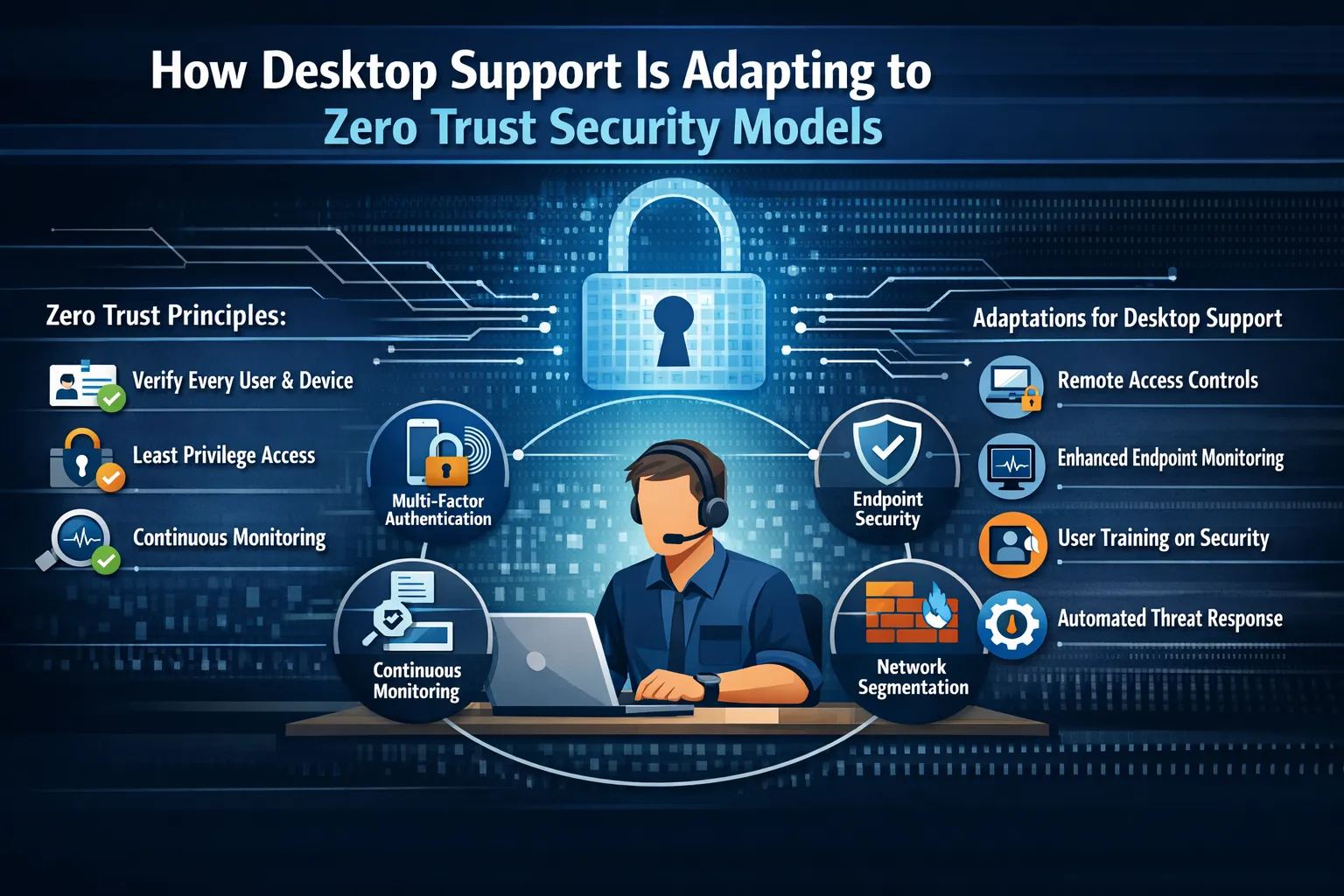
Zero trust security operates on a simple yet powerful principle: never trust, always verify. Unlike traditional security models that trusted anyone inside the corporate network, zero trust treats every access request as if it originates from an untrusted network. Every user, device, and application must prove its identity and authorization before gaining access to resources.
The framework rests on several core pillars. First, identity verification requires continuous authentication rather than one-time login approval. Second, least privilege access ensures users only access what they absolutely need for their work. Third, micro-segmentation divides networks into small zones to maintain separate access controls. Finally, continuous monitoring tracks all activity to detect anomalies and potential threats in real-time.
For desktop support teams, understanding these principles is crucial because they directly impact daily operations. Support tickets are no longer just about technical fixes—they’re about maintaining security integrity while delivering user assistance.
The Changing Role of Desktop Support
Desktop support has traditionally focused on reactive problem-solving: computers crash, software needs installing, printers stop working. Zero trust security transforms this reactive role into a proactive security function. Support technicians now serve as security gatekeepers who must balance user productivity with stringent security requirements.
This shift means desktop support professionals need deeper security knowledge. They must understand encryption protocols, multi-factor authentication systems, and identity management platforms. When a user can’t access a file, the issue might not be a broken connection—it could be a zero trust policy correctly blocking unauthorized access.
The human element becomes even more critical under zero trust. Desktop support teams often serve as the first point of contact when security measures create friction for users. They must explain why certain restrictions exist, guide users through enhanced authentication processes, and help people work securely without circumventing security controls.
Device Onboarding and Management Transformation
Device provisioning has become significantly more complex under zero trust frameworks. Every device must be registered, validated, and continuously monitored before accessing corporate resources. Desktop support teams now manage comprehensive device inventories that track security posture, compliance status, and access privileges.
Modern device onboarding involves multiple security layers. Desktop support technicians must ensure devices have current security patches, proper encryption, endpoint detection and response tools, and compliance with corporate security policies before allowing network access. This process happens not just once during initial setup but continuously throughout the device lifecycle.
Bring Your Own Device (BYOD) policies add another complexity layer. Desktop support must help users configure personal devices to meet zero trust requirements without overstepping privacy boundaries. This delicate balance requires clear policies, user-friendly tools, and patient support staff who can guide non-technical users through complex security setups.
Identity and Access Management Challenges
Authentication has moved far beyond simple username and password combinations. Desktop support teams now manage complex identity verification systems involving multi-factor authentication, biometric verification, hardware security keys, and conditional access policies.
When users encounter authentication issues, desktop support must troubleshoot without compromising security. This means verifying user identities through secure channels before providing assistance, understanding various authentication methods, and helping users recover access without creating security vulnerabilities.
Privileged access management presents particular challenges. Desktop support technicians often need elevated privileges to perform their duties, but zero trust principles require strict controls on administrative access. Support teams must work within just-in-time access systems that grant elevated privileges only when necessary and revoke them immediately after use.
Network Segmentation and Access Control
Zero trust architectures segment networks into small, isolated zones with strict access controls between them. Desktop support teams must understand these segments to effectively troubleshoot connectivity issues. A user unable to access a specific application might be experiencing a zero trust policy working correctly rather than a technical problem.
Supporting users across segmented networks requires detailed knowledge of access policies and network architecture. Desktop support professionals need tools that provide visibility into user access rights and network segments without exposing sensitive security information. They must also help users understand why they can’t access certain resources and guide them through proper request channels.
Virtual Private Networks (VPNs), once the standard for remote access, are being replaced or augmented with zero trust network access solutions. Desktop support teams must transition users from VPN-based access to identity-centric access models, requiring new knowledge and different troubleshooting approaches.
Continuous Monitoring and Threat Response
Zero trust security requires constant vigilance. Desktop support teams increasingly work alongside security operations centers to respond to potential threats. When endpoint detection systems flag suspicious activity on a user’s device, desktop support may need to investigate, contain, and remediate issues quickly.
This proactive stance means desktop support professionals must recognize security incidents and follow proper escalation procedures. They need training in incident response, understanding of common attack vectors, and clear communication channels with security teams.
User education becomes a critical desktop support function. Support technicians often identify security awareness gaps when assisting users. They serve as security educators, explaining why certain security measures exist and helping users develop better security habits.
Automation and Tool Integration
Zero trust environments rely heavily on automation to enforce policies consistently. Desktop support teams must work with automated systems that provision access, deploy security patches, and respond to threats without manual intervention. This automation changes the support role from hands-on fixing to policy management and oversight.
Integration between security tools and support platforms enables better service delivery. When a user submits a support ticket for access issues, integrated systems can automatically check their authentication status, device compliance, and access policies to identify problems faster. Desktop support staff must understand these integrations and use them effectively.
Self-service portals empowered by automation reduce routine support requests while maintaining security. Users can reset passwords, request access, and troubleshoot common issues through secure, automated systems. Desktop support focuses on complex problems that require human judgment and expertise.
Training and Skill Development
The knowledge required for modern desktop support extends far beyond traditional IT skills. Support professionals need security certifications, understanding of compliance frameworks, and familiarity with cloud security architectures. Continuous learning becomes mandatory rather than optional.
Organizations must invest in training programs that keep desktop support teams current with evolving security technologies. This includes both technical training on specific tools and conceptual understanding of security principles. Support staff need to think like security professionals while maintaining their customer service focus.
Cross-functional collaboration becomes essential. Desktop support teams must work closely with security teams, network administrators, and compliance officers. Understanding each team’s priorities and constraints helps desktop support professionals make better decisions and provide more effective assistance.
Balancing Security and User Experience
Perhaps the biggest challenge desktop support faces in zero trust environments is maintaining user productivity while enforcing strict security controls. Security measures that create excessive friction lead to shadow IT and security workarounds that undermine zero trust effectiveness.
Desktop support teams must advocate for user-friendly security solutions while never compromising security principles. This might mean lobbying for better authentication tools, clearer security policies, or streamlined access request processes. Support professionals serve as the voice of users within security discussions.
Measuring success shifts from simple metrics like ticket resolution time to more complex indicators including user compliance with security policies, reduction in security incidents, and user satisfaction with security tools. Desktop support must demonstrate value in both operational efficiency and security effectiveness.
Frequently Asked Questions
What is zero trust security?
Zero trust is a security framework that requires all users and devices to be verified before accessing resources, regardless of their location. It assumes no implicit trust and continuously validates every access request.
How does zero trust affect desktop support daily operations?
Desktop support must verify identities more rigorously, manage complex device compliance requirements, troubleshoot authentication issues, and educate users about security policies while maintaining service quality.
Do desktop support teams need security certifications for zero trust?
While not always mandatory, security certifications like Security+, CISSP, or cloud security credentials significantly help desktop support professionals understand and implement zero trust principles effectively.
What’s the biggest challenge for desktop support in zero trust?
Balancing strict security requirements with user productivity remains the primary challenge. Support teams must enforce security without creating excessive friction that leads users to find workarounds.
How long does it take to adapt desktop support to zero trust?
Adaptation is ongoing rather than a one-time project. Initial implementation might take several months, but continuous learning and refinement continue as technologies and threats evolve.
Can small organizations implement zero trust with limited support staff?
Yes, through automation, cloud-based security tools, and managed security services. Smaller teams can implement zero trust principles scaled to their organization’s size and resources.
Conclusion
Desktop support’s adaptation to zero trust security models represents a fundamental shift in how IT support teams operate. No longer simply fixing technical problems, support professionals now serve as critical components in organizational security architecture. They verify identities, manage device compliance, educate users, and respond to security incidents while maintaining the user-focused service that defines effective support.
The transition requires new skills, different tools, and a security-first mindset. Desktop support teams must embrace continuous learning, collaborate across departments, and balance security requirements with user needs. Those who successfully navigate this transformation position themselves as invaluable assets in an increasingly security-conscious business environment.
As cyber threats continue evolving and work environments become more distributed, zero trust frameworks will only grow more prevalent. Desktop support teams that adapt quickly and thoroughly will not only survive this transformation—they’ll thrive, taking on more strategic roles within their organizations and advancing their careers in the process.






No comment